Drag every project from idea to done
Six default stages, fully customizable per deck. Drag-and-drop cards, batch operations, and a pipeline bar that shows exactly where your catalog stands.
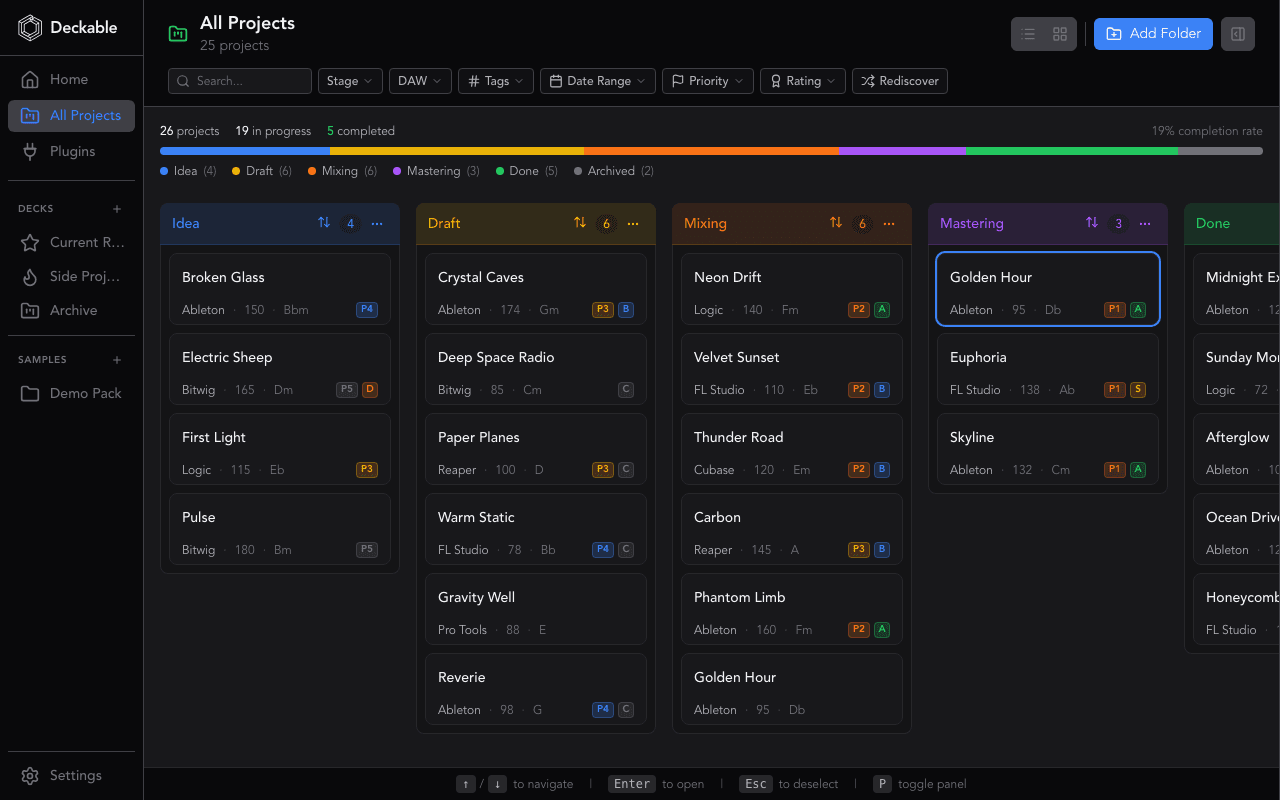
TL;DR: Drag your music projects from Idea to Done across six customizable stages. Separate boards for albums and clients, batch operations for bulk moves, and a pipeline bar that shows exactly where your catalog is piling up.
The visibility problem
You have projects scattered across drives with no clear picture of what’s in progress, what needs mixing, and what’s done. Without a visual system, tracks slip through the cracks and half-finished ideas pile up in forgotten folders.
Six stages by default — customize to fit how you work
Deckable ships with six stages: Idea, Draft, Mixing, Mastering, Done, and Archived. Rename them, add new ones, or remove what doesn’t fit — each deck gets its own configuration. Drag a card from one column to the next as your track progresses.
Separate boards for every project type
Create separate decks for albums, clients, or genres. Your beat tape and your film score each get their own board. Drag projects onto sidebar decks to add them instantly, and switch between boards without losing your place.
See bottlenecks before they pile up
The pipeline bar is a color-coded progress bar at the top of your board showing project distribution across all stages. Thirty projects stuck in Mixing? You’ll see it immediately. Select multiple projects and move them to a new stage, tag them, or reassign decks in a single action.
Why use Deckable's Kanban Board?
- See every project’s status across customizable stages — no spreadsheets
- Separate boards for albums, clients, and genres with multi-deck workspaces
- Move, tag, or reassign dozens of projects at once with batch operations
- Reorderable and resizable columns that remember your layout
- Pipeline bar shows exactly where your catalog is piling up
Learn more
All Features
Explore all 119 features across projects, samples, plugins, and sessions.
Deckable for Ableton Live
See how Deckable organizes your .als projects.
Deckable for FL Studio
See how Deckable organizes your .flp projects.
Deckable vs Manual Methods
Why dedicated project management beats folders and spreadsheets.
Alternatives Compared
How Deckable compares to dBdone, SessionDock, MAKID, and more.
Kanban Board FAQ
Six by default: Idea, Draft, Mixing, Mastering, Done, and Archived. You can customize stages per deck from Settings to match how you actually work.
Yes. Create separate decks for albums, clients, genres, or any grouping you want. Each deck gets its own kanban view with independent column layout.
Drag project cards between columns to change their stage. You can also drag projects onto sidebar decks to add them to a workspace, and drag columns themselves to reorder your board layout.
Trello and Notion require you to type in every project manually. Deckable auto-scans your DAW files and populates cards with BPM, key, plugins, and samples. Your kanban board stays in sync with your actual project files — not a separate system you have to maintain.
Yes. Rename stages, add new ones, or remove stages that don’t fit — all from Settings. Each deck can have a completely different stage configuration.
Ready to organize your projects?
Free for 14 days. Every feature included. No credit card.
Deckable is a desktop app for macOS and Windows.
Send yourself a download reminder for when you're at your desk.
Yours free for 14 days,No credit card,Your music stays on your machine